When I received the machine, the hard drive — a Tandon TM262 connected to a Western Digital WD1002S — was not working correctly. When the machine was powered on, the hard drive spun up, but the usual MS-DOS tools, like FDISK and FORMAT, were unable to operate on the drive.
Using the original Amstrad DOS 3.1, starting FDISK resulted in:
Error reading fixed disk.FDISK then quit.
Referring to the user manual, there is a tool on Disk 4 of the original disks that includes a tool called HDFORMAT (link to be added).
Running this utility resulted in the error:
Format failed.HDFORMAT then quit.
Low Level Formatting
Older hard drives require low level formatting, to ensure that all tracks and sectors are written to the disk. There are a number of ways of achieving this — in fact, as I understand it, the HDFORMAT tool that Amstrad provided is such a method.
In addition to this, there are a number of other ways to proceed.
Controller low level formatting
The WD1002S includes a low level format utility in the BIOS. This is started by running the DOS program DEBUG, and executing the following command:
g=c800:5The following output is displayed:
WX2 Format Revision 7.0 (C) Copyright Western Digital Corp. 1985
(AH) = Relative drive number (0-7)
(AL) = Interleave factor (3 is standard)
Press "Y" to begin formatting drive XX with interleave YY
Pressing Y initiates the low level format, which takes a number of hours to complete.
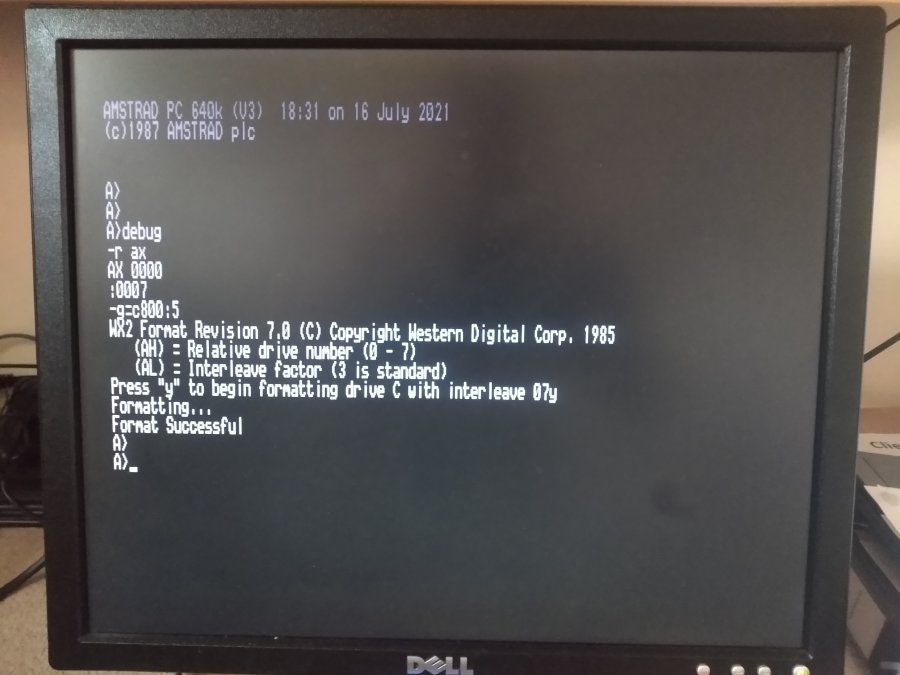
Unfortunately, in my attempt, although a "Format complete" message was displayed, the usual FDISK and FORMAT tools again did not work correctly, nor did the Amstrad HDFORMAT tool.
SpeedStor
SpeedStor is a utility program that has functionality to initialize a disk (low level format) and carry out diagnostic testing of the hard drive controller and drive.
I used version 6.03 — download it here.
Going through the menus, I was able to select the correct hard drive type, but there was a strange issue — even though it displayed the correct drive geometry:
Cylinders     615
Heads           4
Sector/track   17
The top part of the display did not show the correct information.

The initialize function did not work correctly, and even when setting manual geometry within the program, it was unable to complete successfully.
Debug low level format
This page on minuszerodegrees.net notes a way to manually low level format a hard drive, without a BIOS low level format utility.
This process was successful, and I was able to use FDISK to partition the hard drive, and FORMAT to prepare the disk for use.
The hard drive now operates correctly.
